
PowerPack Sanitizer.
A certificate that tells the truth.
Erase any drive to NIST SP 800-88 from a USB stick. Hardware secure erase for NVMe and SATA, verified overwrite when that is not available, and a signed record for every drive. No installs, no internet, no key prompts.
Every retired computer is a data leak waiting for a loading dock.
I built Sanitizer to replace the commercial wipe tool we were paying for in university IT decommissioning. It uses the drive’s own hardware erase whenever it can, proves the result by reading the drive back, and then writes down exactly what happened, including what it could not do. There is no force flag and no way to make a failed erase look like a pass.
NVMe, on real hardware
Dell OptiPlex 7490, Kioxia 512 GB NVMe SSD. NVMe Sanitize (block erase), full 512 GB read back confirmed blank: NIST 800-88 Purge.
SATA, on real hardware
Dell Latitude 5500, Samsung PM871b 256 GB SATA SSD. Locked by firmware, released by Unfreeze, ATA Security Erase (enhanced), full read back blank: NIST 800-88 Purge.
Tested like it matters
75 unit tests, 31 loop device integration checks, browser tests of both web pages, and BIOS and UEFI emulator tests, including a 16 drive parallel erase and a drive unplugged mid erase.
Download the ISO
Anyone can download it. It is locked: it boots, but refuses to touch a drive.
Get your license key
Your key (it starts with PPSAN1-) arrives by email right after purchase, or after you request a free evaluation.
Unlock it in your browser
Drop the ISO and paste the key on the Unlock page. The key is checked and written into the ISO right there. Nothing is uploaded.
Write it to USB and boot
Use Rufus, balenaEtcher or dd. That stick boots straight into the tool every time, with no key prompts.
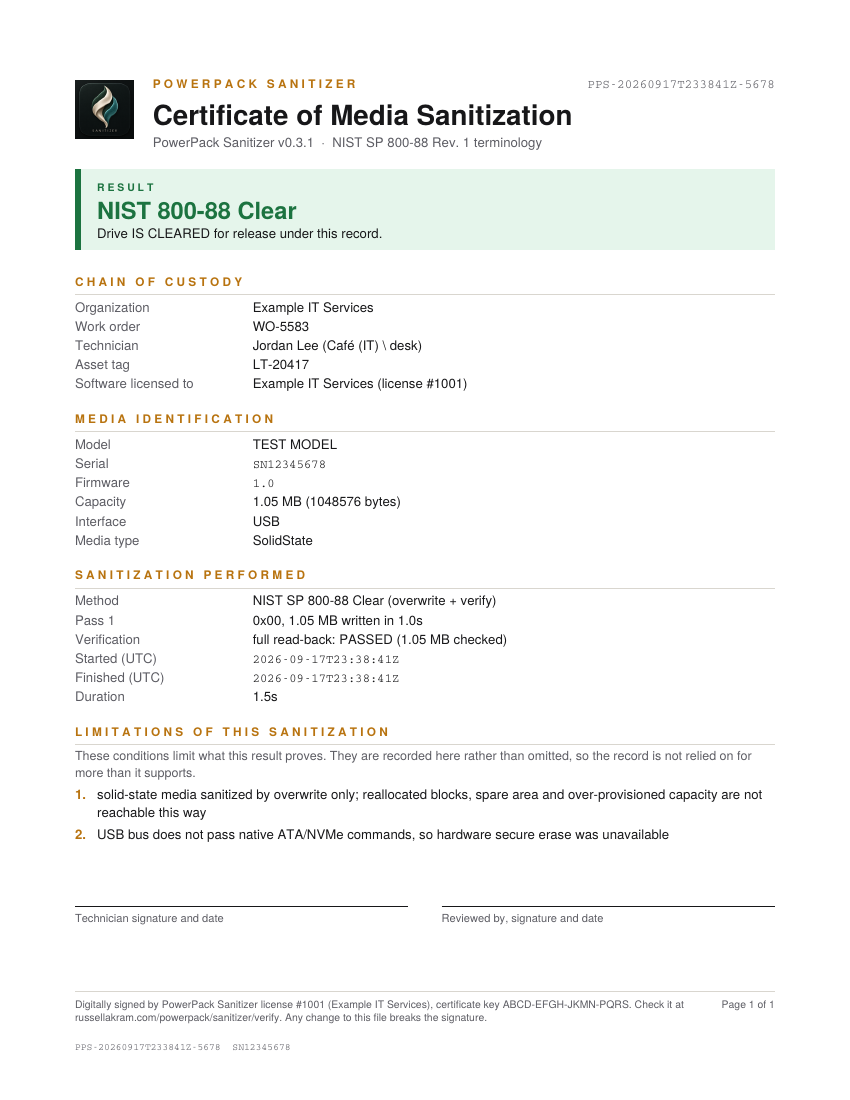
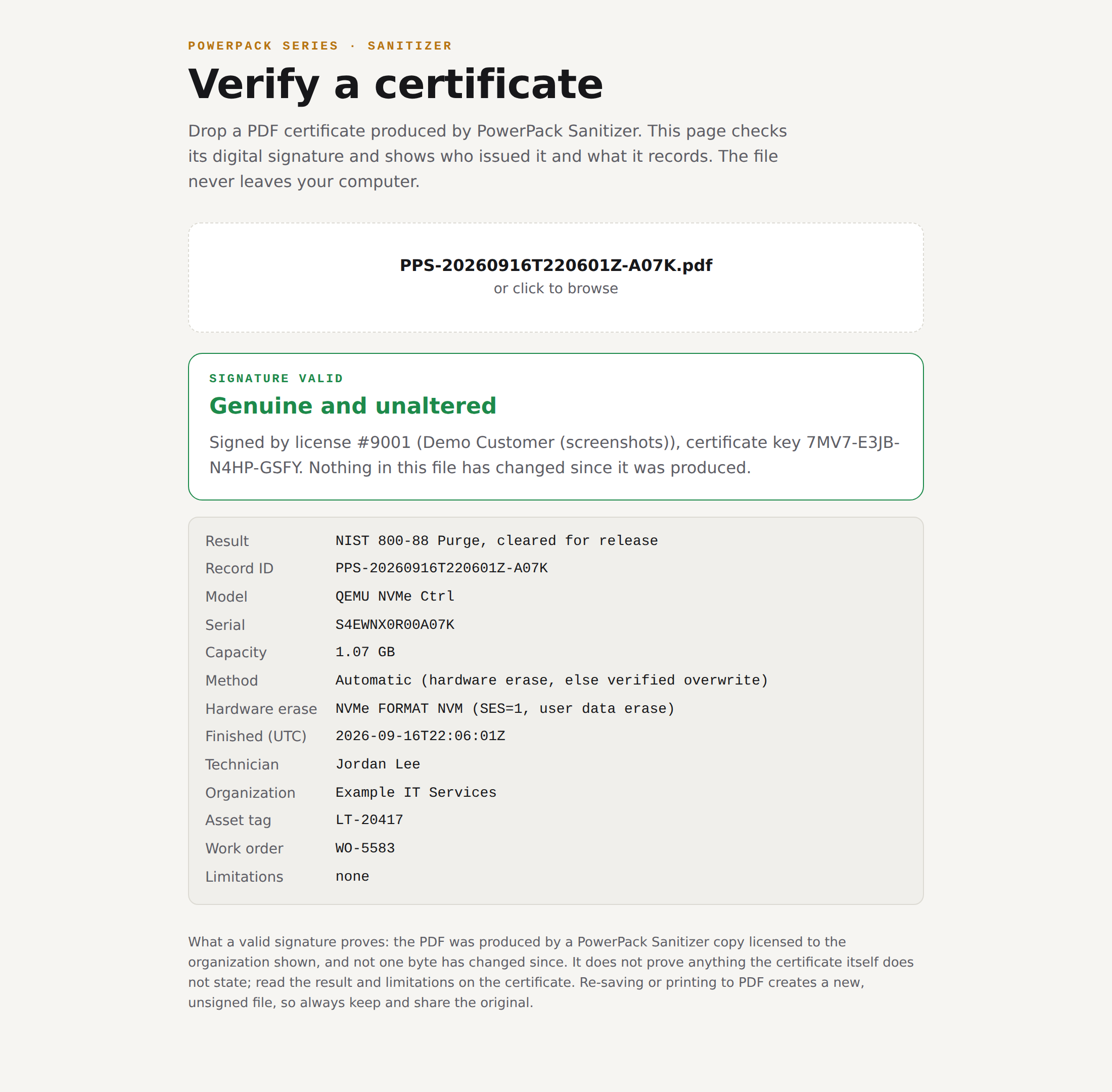
Signed certificates anyone can verify
Every PDF is digitally signed. Auditors and equipment buyers can check one in seconds on the Verify page, in the browser, no account needed.
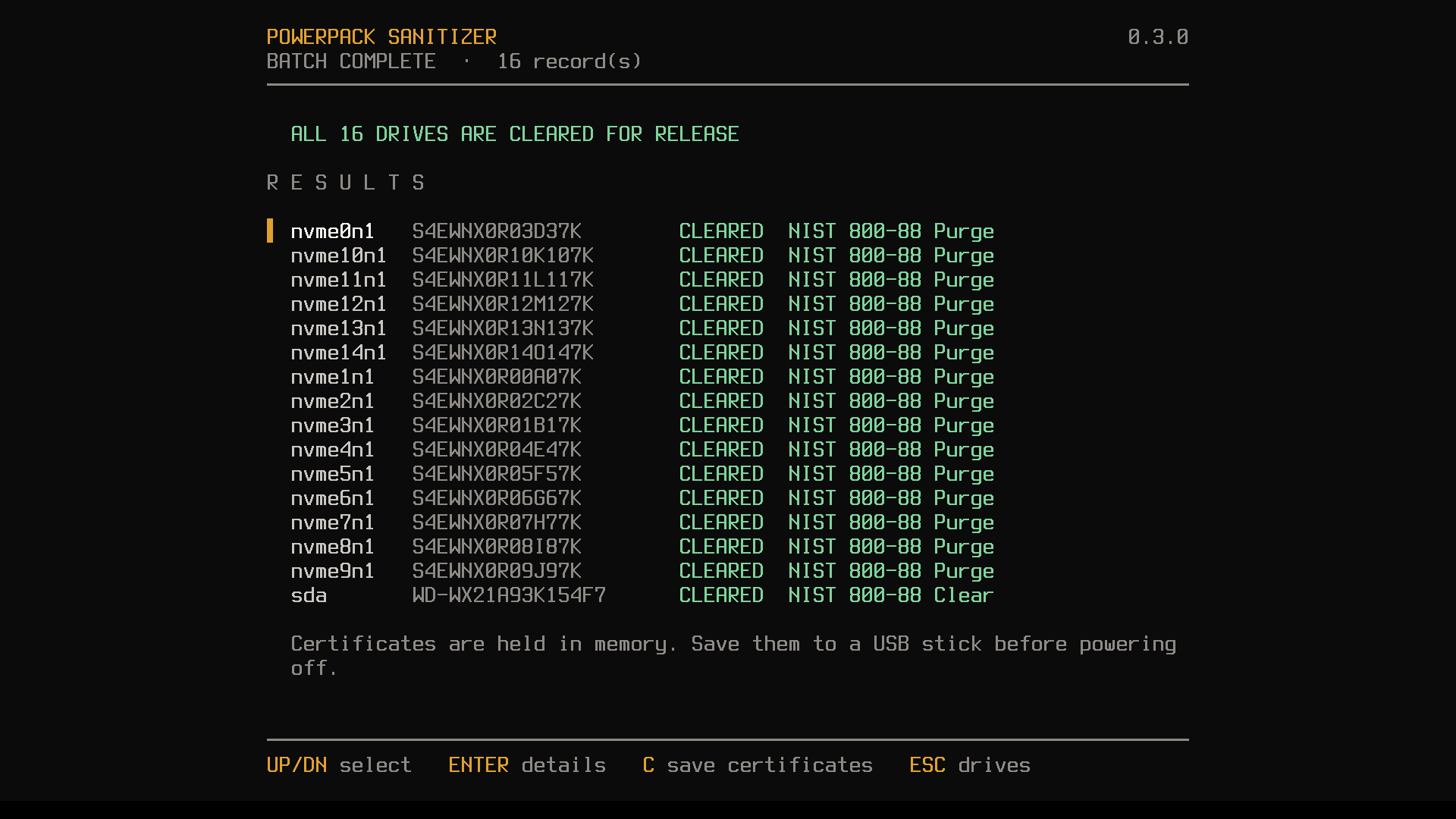
16 drives at once
Each confirmed by its own serial and given its own certificate. One failed drive does not stop the others.
Hardware erase first
NVMe Sanitize (block and crypto), NVMe Format with secure erase, ATA Security Erase (normal and enhanced). Verified overwrite as the fallback.
Finds hidden capacity and erases that too
Detects and removes a Host Protected Area or Device Configuration Overlay, erases the full capacity, and records what it found on the certificate.
Proof, not promises
Samples up to 1024 regions before the erase and proves they changed, with an optional full read back of the whole device.
Honest verdicts
Purge only for a completed, verified hardware erase. Overwrite is Clear at most. Any failure is INCOMPLETE. Limitations are printed on the certificate.
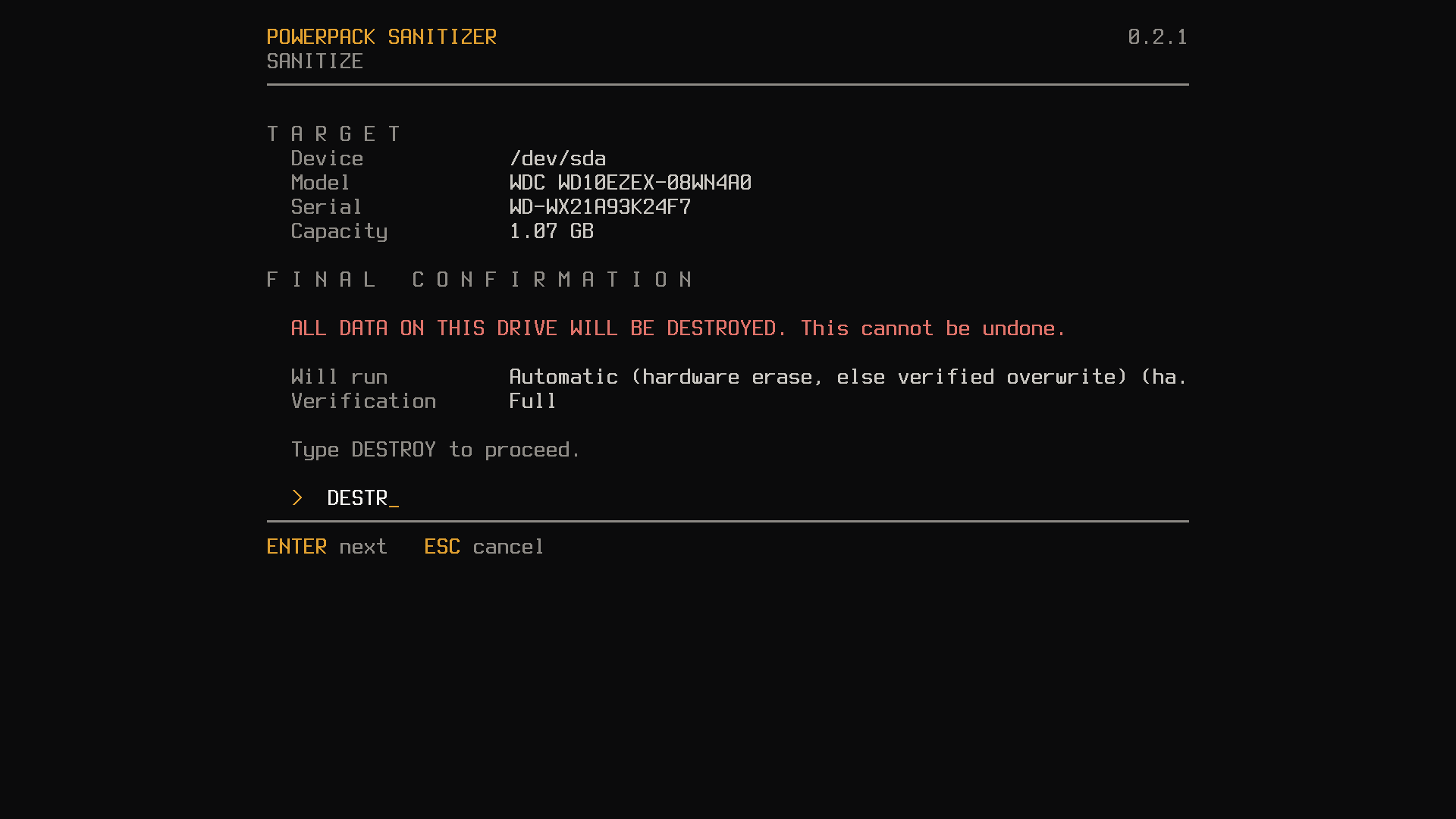
Cannot wipe the wrong drive
The boot stick can never be targeted. You type the last four characters of the serial, then DESTROY, before anything is written.
Unfreezes locked SATA drives
Detects drives the computer firmware has locked and releases them with a short sleep and wake.
Audit ready
Signed PDF, text certificate, JSON record and a running CSV log for every drive, filed by date, service tag and drive serial.
Pay once. Erase forever.
Full features. The key expires after 14 days. Made for IT teams testing before purchase.
One named technician, unlimited computers and drives. Perpetual. Updates for all 0.x and 1.x releases.
Unlimited technicians at one physical location. Perpetual. Same updates.
Several locations, or erasure as a service for your own clients.
Get a quoteKeys are non-transferable. The licensee name is shown on screen every time the tool starts. Pay by card, Apple Pay or Link through Stripe, and the key is emailed the moment payment clears.
Download
966cf74dfe690f01525a3628e9593daa6ac8e9288a8688601db003147b35e9e9It boots, but refuses to touch a drive until it is unlocked with a key on the Unlock page. Write the unlocked ISO to USB with Rufus, balenaEtcher or dd. The user guide walks through every step.
Specifications
- Boots on
- 64 bit Intel and AMD PCs and laptops, UEFI or legacy BIOS
- Size
- About 32 MB, runs entirely in memory
- Methods
- Automatic, Secure erase, Cryptographic erase, NIST 800-88 Clear, DoD 5220.22-M
- Hardware erase
- NVMe Sanitize, NVMe Format (secure erase), ATA Security Erase
- Verification
- Up to 1024 sampled regions, optional full read back
- Batch
- Up to 16 drives at once
- USB adapters
- Supports USB to SATA adapters, and explains when one blocks hardware erase
- Records
- Signed PDF, text, JSON, CSV audit log
- Licensing
- Ed25519 signed keys, verified offline
- Not supported
- Apple Silicon Macs. Secure Boot must be turned off
- Download
- ppsanitize-0.3.1.iso · SHA-256 966cf74dfe690f01525a3628e9593daa6ac8e9288a8688601db003147b35e9e9
Questions
Does it need internet or an account?+
No. Keys are checked offline.
Do I enter the key every time?+
No. Unlock the ISO once and every stick you make from it just works.
Is my ISO or key uploaded when I unlock?+
No. The Unlock page runs entirely in your browser.
Which computers does it support?+
64 bit Intel and AMD PCs and laptops, UEFI or BIOS. Turn off Secure Boot. Apple Silicon Macs are not supported.
Can someone check my certificates?+
Yes. Every PDF is digitally signed, and the Verify page checks it in the browser.
What about drives that hide part of themselves?+
The tool checks every SATA drive for a Host Protected Area or Device Configuration Overlay, removes it, and erases the full capacity. What it found is written on the certificate.
Is it certified?+
It implements the NIST SP 800-88 Clear and Purge methods and reports exactly what was done. It is not third-party certified.
Can I move my key to someone else?+
No. Keys are non-transferable, and the licensee name is shown on screen every time the tool starts.
Licensed per technician or per site. Keys are checked offline and never expire.
Build a bundle, 15% off →